What if your next big sale didn’t come from a website, ad campaign, or email funnel, but from a simple conversation on WhatsApp? That’s not wishful thinking. It’s the new reality of selling in 2026. WhatsApp is no longer just a messaging app—it’s a powerful, high-converting sales channel hiding in plain sight. And if you’re not using it to connect with customers and close deals, you’re leaving money on the table.
In this guide, you’ll discover exactly how to sell on WhatsApp easily, without expensive tools or complex strategies. Whether you’re running a solo side hustle or scaling a growing business, we’ll break it down step by step—with no fluff, outdated info, or recycled advice. Let’s get into it.
Why Selling on WhatsApp is a Smart Move in 2026
- 98% open rates. People open WhatsApp messages faster than emails or ads.
- Frictionless selling. Customers can view your products, ask questions, and place orders—all in one chat.
- Trust through conversation. Real-time, personalized chats feel more authentic than websites.
- Cost-effective. No website? No problem. WhatsApp is your digital storefront.
- LSI boost: Direct messaging app for business, conversational commerce, instant engagement.
How to Build a High-Converting WhatsApp Sales Funnel
Selling on WhatsApp works best when it’s part of a well-thought-out funnel. Here’s a lean, proven model:
- Attract – Use Instagram, Facebook, or email to offer something valuable (e.g., discount, freebie, checklist).
- Engage – Once they message you, respond quickly and personally.
- Nurture – Share helpful content, answer questions, build rapport.
- Convert – Use a direct offer, product recommendation, or limited-time deal.
- Follow Up – Use labels, reminders, and feedback messages to re-engage.
When you guide your prospect like this, your close rates go up—without sounding salesy.
What Types of Products or Services Sell Best on WhatsApp?
Not everything works equally well on WhatsApp. Here are categories that consistently perform:
- Local services: Beauty, repairs, coaching, home care.
- Handmade or personalized products: Jewelry, crafts, gifting.
- Digital products: Courses, consultations, templates.
- High-trust services: Real estate, finance, legal, coaching.
Why these work? Because WhatsApp gives a personal touch, lets people ask questions, and builds 1:1 trust—perfect for considered purchases.
Step 1: Set Up WhatsApp Business Like a Pro
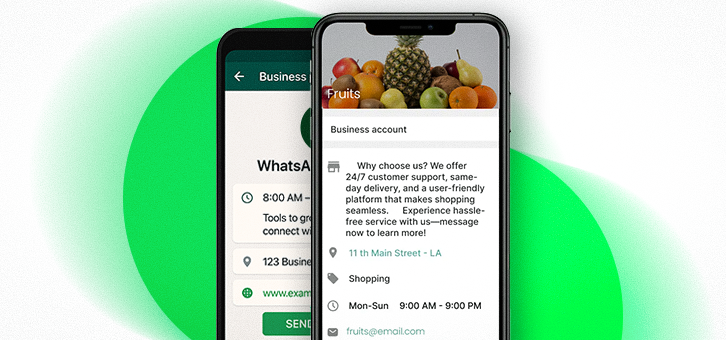
Download the WhatsApp Business App (free for Android & iOS).
Optimize Your Profile:
- Business name + logo (branding matters)
- Contact details (email, phone, website)
- Business hours
- Description that clearly states what you offer
- Store location (if applicable)
Pro Tip: Treat this like your LinkedIn profile—first impressions matter.
Step 2: Build a Product Catalog That Converts
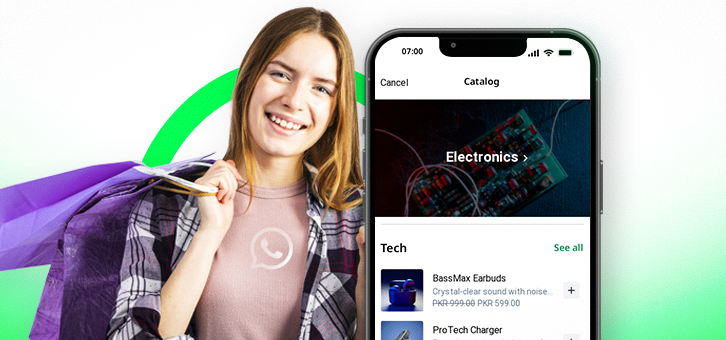
Think of your WhatsApp Catalog as your mini-store. To set it up:
Go to: Settings > Business Tools > Catalog > Add Product/Service
Include:
- Clear product images
- Price (and discounts, if any)
- Descriptions with benefits, not just features
- Product codes or SKUs for inventory ease
Why it works:
You make it effortless for your customer to browse, choose, and buy—all without leaving the chat. It’s frictionless commerce.
Mistakes to Avoid When Selling on WhatsApp
Let’s face it—WhatsApp is powerful, but easy to misuse. Here are traps to avoid:
- ❌ Sending unsolicited messages (spam risk)
- ❌ Ignoring message volume (slow responses kill trust)
- ❌ Using too much automation (you sound like a bot)
- ❌ Pitching too early (build value first)
- ❌ Broadcasting irrelevant promos
Avoid these, and you’ll stand out instantly.
How to Collect Leads and Build a WhatsApp Audience Legally
Want more chats? Here’s how to grow your list—without crossing the line:
- ✅ Use Click-to-Chat links in bios, ads, and websites
- ✅ Offer lead magnets like checklists, guides, coupons
- ✅ Promote your WhatsApp in stories, reels, and posts
- ✅ Use opt-in forms and QR codes in-store or at events
Note: Never buy contacts or scrape numbers. It’s not just ineffective—it’s against WhatsApp policies.
Integrating WhatsApp with Instagram, Facebook, and Your Website
Make WhatsApp the core of your conversion journey:
- Add the “Message” button to Instagram business profiles
- Use Facebook Click-to-WhatsApp Ads for direct conversion
- Add Click-to-Chat buttons on product pages and checkout flows
- Connect with Shopify, WooCommerce, or custom sites using tools like Zoko or Interakt
This unified flow gives customers one-click access to you, increasing conversion by removing friction.
Step 3: Use Tags to Organize Like a Sales CRM
Sales is about timing and follow-up. Use WhatsApp labels to organize leads:
- 🟡 New Leads
- 🟢 Payment Pending
- 🔵 Order Confirmed
- 🟠 VIP Customers
- 🔴 Follow-Up Later
LSI Keywords Used: Sales funnel management, customer segmentation.
These labels act like a CRM inside your inbox, helping you stay on top of every chat.
Step 4: Automate the Smart Way
No one likes sounding like a robot, but some automation is essential. Use:
- Greeting messages: Say hi instantly when someone messages you
- Quick replies: Save time on FAQs (“Do you offer cash on delivery?”)
- Away messages: Don’t leave people hanging after hours
Settings > Business Tools > Messaging Tools
Pro Tip: Always personalize. Automation gets you in the door; personality closes the sale.
Step 5: Broadcast Without Being Spammy
Use Broadcast Lists to send messages to many at once—but only to those who’ve saved your number.
Use it for:
- New arrivals
- Flash sales
- Festival offers
- Back-in-stock alerts
Keep it valuable:
Make sure every broadcast answers one question: “Why should they care?
How to Use Stories and Status Updates to Boost Engagement
WhatsApp Status is underused—and that’s your opportunity.
- 🟢 Showcase new arrivals with photos/videos
- 🟢 Share behind-the-scenes moments
- 🟢 Post customer testimonials
- 🟢 Create urgency with countdowns or limited-time offers
People check the status like they check Instagram Stories. Done right, it drives silent engagement and reactivates cold leads.
Step 6: Use Click-to-Chat Links to Drive Leads
Make it ridiculously easy for people to start a conversation with you. Use WhatsApp’s Click-to-Chat feature:
Example: https://wa.me/15551234567
Embed this link in:
- Instagram/Facebook bios
- Email signatures
- Product pages
- Paid ads
It reduces the barrier to entry—and more chats = more chances to sell.
Step 7: Build Unshakable Customer Trust
Selling is easy when customers trust you. Here’s how to earn it:
- Respond quickly – Especially to new inquiries
- Personalize your tone – Use their name, mention their interest
- Show proof – Use testimonials, reviews, or product use videos
- Use the green check – Apply for the WhatsApp Business verification badge
LSI keywords: Social proof, trust-based selling, buyer confidence.
Step 8: Scale Your Sales with the WhatsApp API
If you’re growing fast or managing large volumes of orders, consider the WhatsApp Business API.
Use it for:
- Bulk messaging
- CRM and eCommerce integrations
- Automated flows
- Customer service bots
- Advanced analytics
Recommended Tools: Wetarseel, Wati, Twilio, Rasayel, Zoko
Note: It requires approval and may incur costs, but it’s worth it when you’re scaling.
Tracking WhatsApp Sales Performance: What to Measure and Why
If you can’t measure it, you can’t improve it. Focus on:
- Response time – Aim for under 5 minutes
- Conversion rate per chat – Track offers vs. sales
- Repeat customer rate – A strong sign of trust
- Broadcast performance – Opens, clicks, replies
- Customer satisfaction – Short surveys post-purchase
Use tools like WhatsApp Web, Google Sheets, and Zapier to log and analyze data easily.
Real-Life WhatsApp Selling Examples (What’s Working in 2026)
- Local Boutique: 3X’d weekly sales by posting Status updates + replying to DMs within 30 mins.
- Fitness Coach: Built a funnel using Instagram Reels + Click-to-Chat, converting leads into $499 coaching packages.
- Furniture Store: Used catalog + quick replies to handle 80% of customer questions with one assistant.
These aren’t outliers. They’re businesses that leaned into personalized selling—and used WhatsApp as their primary channel.
Best Practices for WhatsApp Selling
✅ Write like a human: clear, helpful, and engaging.
✅ Use product visuals and short videos
✅ Keep messages brief but informative
✅ Don’t oversell—build value first
✅ Respect time zones and business hours
✅ Track which types of messages convert best
FAQs: Selling on WhatsApp (2026Edition)
1. Can I sell without a website?
Yes. WhatsApp Catalog acts as your digital storefront. Combine it with Click-to-Chat and social media to drive traffic.
2. Is WhatsApp Business free?
Yes, the app is free. Advanced features via the API may have costs.
3. Can I automate order confirmations?
Yes, using the WhatsApp Business API and third-party tools like Wati or Twilio.
4. How do I avoid being marked as spam?
Only message people who have opted in or saved your number. Keep content relevant and value-driven.
5. What’s the difference between Broadcast and Group?
Broadcast = one-way private messages. Group = public thread visible to all members.
6. Can I link WhatsApp with my Instagram shop?
Yes. Use Instagram’s action button to integrate WhatsApp as a direct contact option.
7. How do I get the green check on WhatsApp?
Apply via Meta’s Business Manager. You’ll need verification and a consistent brand presence.
Final Thoughts: Make WhatsApp Your Secret Sales Weapon
Selling on WhatsApp isn’t just trendy—it’s effective, scalable, and future-proof. With the right tools, tone, and strategy, WhatsApp can become your most personal and profitable sales channel.
From your first message to your 1,000th order, this guide equips you with everything you need to start strong and scale fast.