Quick Answer
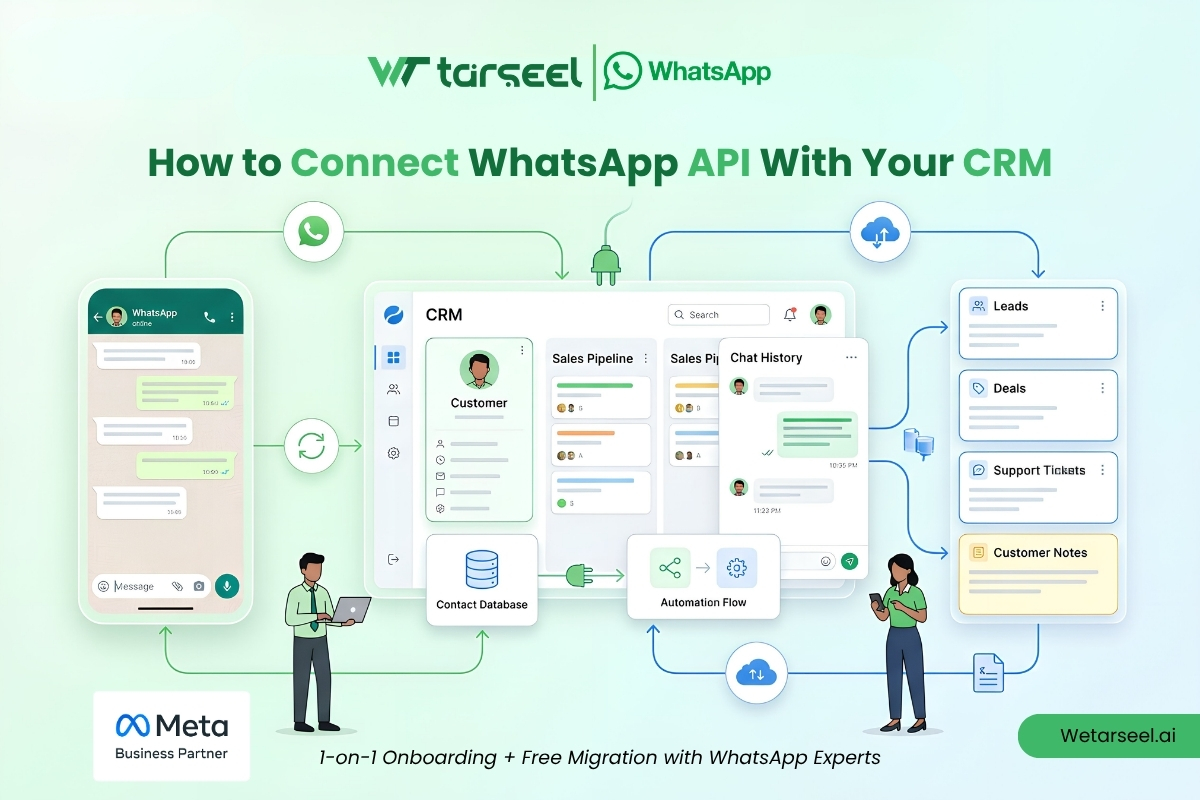
To connect WhatsApp API with your CRM, businesses typically use the WhatsApp Business Platform alongside APIs, webhooks, middleware, or native CRM integrations. This connection allows customer conversations, contact data, lead information, and messaging activity to synchronize between WhatsApp and the CRM, enabling automated workflows, centralized communication, and better customer relationship management.
Key Takeaways
| Benefit | Business Impact |
|---|---|
| Centralized customer communication | Higher team efficiency |
| Automatic lead capture | Faster response times |
| CRM contact synchronization | Better customer records |
| Workflow automation | Reduced manual work |
| Conversation history visibility | Improved customer experience |
| Sales and support tracking | Better reporting and accountability |
What Does It Mean to Connect WhatsApp API With a CRM?
Connecting WhatsApp API with a CRM means linking customer conversations on WhatsApp to your customer relationship management system.
Instead of managing conversations separately, businesses can:
store customer interactions in one place
track leads automatically
view conversation history
trigger automated workflows
assign conversations to teams
improve customer service operations
The goal is to create a single source of truth for customer communication.
Whatsapp Business API – The Complete Guide
Why Do Businesses Integrate WhatsApp With Their CRM?
Modern customer communication happens across multiple channels.
Customers may:
submit a website inquiry
respond to a marketing campaign
send a WhatsApp message
contact support later
Without CRM integration, customer information becomes fragmented.
With proper WhatsApp CRM integration, businesses can connect every interaction to a single customer profile.
How to Connect WhatsApp Business API with n8n via Wetarseel
What Can a WhatsApp CRM Integration Do?
A properly configured integration can automate multiple business processes.
1- Lead Management
Automatically create CRM contacts when customers message your business.
2- Conversation Tracking
Store WhatsApp conversations within customer records.
3- Sales Automation
Notify sales teams when high-value leads engage.
4- Customer Support
Provide agents with complete customer history.
5- Workflow Automation
Trigger actions based on customer behavior.
Examples include:
creating support tickets
assigning sales representatives
sending appointment reminders
updating deal stages
WhatsApp API for Shopify Post‑Purchase Communication: 2026 Complete Guide
How Does WhatsApp API Connect to a CRM?
Most integrations follow a similar architecture.
Step 1: Customer Sends a WhatsApp Message
The customer initiates communication through WhatsApp.
Step 2: WhatsApp API Receives the Message
The WhatsApp Business Platform processes the message and generates event data.
Step 3: Webhooks Deliver Data
Webhooks transmit conversation events to connected systems.
These events may include:
incoming messages
delivery statuses
read receipts
customer interactions
Step 4: CRM Updates Records
The CRM receives the webhook data and updates:
contacts
leads
opportunities
tickets
customer activity timelines
Step 5: Automated Workflows Execute
Based on predefined business rules, the CRM may trigger:
notifications
follow-ups
task assignments
marketing sequences
What Information Can Be Synced Between WhatsApp and a CRM?
The exact data depends on the CRM and integration method, but common examples include:
(Meta’s official WhatsApp Cloud API Documentation provides detailed information about the data objects and messaging capabilities available to developers.)
| Data Type | Typical Sync Direction |
|---|---|
| Customer name | Two-way |
| Phone number | Two-way |
| Conversation history | WhatsApp to CRM |
| Lead status | CRM to WhatsApp workflows |
| Sales stage | CRM to automation system |
| Support ticket information | CRM to WhatsApp workflows |
| Customer notes | CRM managed |
The objective is to keep customer information accurate and accessible across systems.
Which CRMs Commonly Support WhatsApp API Integrations?
Many CRM platforms support WhatsApp integrations either natively or through third-party connectors.
Common examples include:
HubSpot
Salesforce
Zoho CRM
Microsoft Dynamics 365
Pipedrive
Freshsales
Some organizations also build custom integrations using APIs and webhooks.
The implementation method depends on business requirements and technical resources.
What Are the Main Ways to Connect WhatsApp API With a CRM?
Businesses typically choose one of three approaches.
Native CRM Integration
Some CRM platforms provide built-in WhatsApp integration capabilities.
Advantages:
faster deployment
simplified maintenance
lower technical complexity
Best for:
small businesses
growing teams
non-technical organizations
Integration Platforms
Middleware platforms can connect WhatsApp and CRMs without extensive custom development.
These tools act as connectors between systems.
Advantages:
flexible workflows
reduced development effort
faster implementation
Best for:
marketing teams
operations teams
mid-sized organizations
Custom API Integration
Organizations with advanced requirements often build direct integrations using:
APIs
webhooks
internal applications
Advantages:
maximum flexibility
complete control
custom workflows
Best for:
SaaS companies
enterprises
high-volume messaging operations
What Are the Benefits of Connecting WhatsApp API With a CRM?
Faster Lead Response Times
Speed is often critical in sales.
When leads automatically enter the CRM, teams can respond faster and improve conversion opportunities.
Better Customer Context
Support and sales teams gain visibility into:
previous conversations
customer history
purchases
support interactions
This reduces repetitive questioning and improves customer experience.
Improved Automation
Businesses can automate repetitive tasks such as:
lead qualification
follow-up reminders
appointment confirmations
customer onboarding
Automation reduces manual workload and improves consistency.
Centralized Reporting
Managers can monitor:
conversation volume
lead generation
response times
customer engagement
without switching between multiple systems.
Common Mistakes Businesses Make During WhatsApp CRM Integration
1- Ignoring Data Mapping
Customer fields should be mapped carefully.
Poor data mapping often causes:
duplicate records
inaccurate reporting
workflow failures
2- Not Planning Automation Logic
Many businesses connect systems before defining workflows.
Successful integrations require clear rules for:
lead routing
ticket creation
follow-ups
customer segmentation
3- Failing to Monitor Webhooks
Webhooks are critical for synchronization.
If webhook failures go unnoticed, customer data may become outdated or incomplete.
4- Over-Automating Customer Conversations
Automation should improve communication, not replace meaningful customer interactions.
Businesses should balance automation with human support when appropriate.
Expert Insight: Why CRM Integration Is Often the Turning Point for WhatsApp ROI
Many businesses initially use WhatsApp only as a messaging channel.
The real value often emerges when WhatsApp becomes connected to customer data.
Once conversations, contacts, support records, and sales pipelines are unified, teams gain better visibility, automation becomes more effective, and customer communication becomes easier to manage at scale.
For many organizations, CRM integration transforms WhatsApp from a communication tool into a core business workflow platform.
Final Thoughts
Understanding how to connect WhatsApp API with your CRM is essential for businesses looking to scale customer communication efficiently.
A successful WhatsApp CRM integration helps organizations:
centralize customer data
automate workflows
improve lead management
streamline support operations
deliver better customer experiences
The most effective implementations focus not only on connecting systems but also on creating workflows that make customer interactions more organized, responsive, and actionable.
Frequently Asked Questions (FAQs)
-
Do I need a CRM to use WhatsApp API?
No. Businesses can use WhatsApp API without a CRM. However, CRM integration often improves visibility, automation, and customer management.
-
Can WhatsApp messages automatically create leads in a CRM?
Yes. Many integrations can create new contacts or leads when customers initiate conversations.
-
Can CRM workflows trigger WhatsApp messages?
Yes. Businesses commonly use CRM events to trigger approved WhatsApp messaging workflows. These messages must still comply with WhatsApp Business Platform policies.
-
Is coding required to connect WhatsApp API with a CRM?
Not always. Some CRM systems offer native integrations, while others may require middleware or custom API development.