Click-to-WhatsApp ads: turn ad clicks into WhatsApp leads
Stop sending ad clicks to forms that nobody fills. Start the conversation where your customers already are, and automate the first reply so no lead waits.
Start a free trial Chat on WhatsAppWhat are Click-to-WhatsApp ads?
CTWA ads are Meta ads on Facebook and Instagram with a button that opens a chat with your WhatsApp Business number instead of a website. The customer sends the first message, so the chat starts with real interest. It suits businesses that sell through conversation, such as car dealers, schools and academies, real estate and local services.
Meta’s free message window for ad chats
Meta rewards ad conversations with free messaging. According to Meta’s documentation:
- When a customer messages you from a CTWA ad and you reply within the customer service window, that reply opens a free entry point window that can stay open for up to 7 days.
- While it is open, Meta does not charge for marketing, utility, authentication or service messages.
- It applies when the customer contacts you from the WhatsApp app on Android or iOS, not the desktop or web app.
- Messages from Meta Business Agent are still charged.
Source: Meta’s WhatsApp Business Platform pricing documentation. Rules and rates can change, so check Meta’s page before you plan a budget. Estimate your costs with our pricing calculator and read how WhatsApp API pricing works.
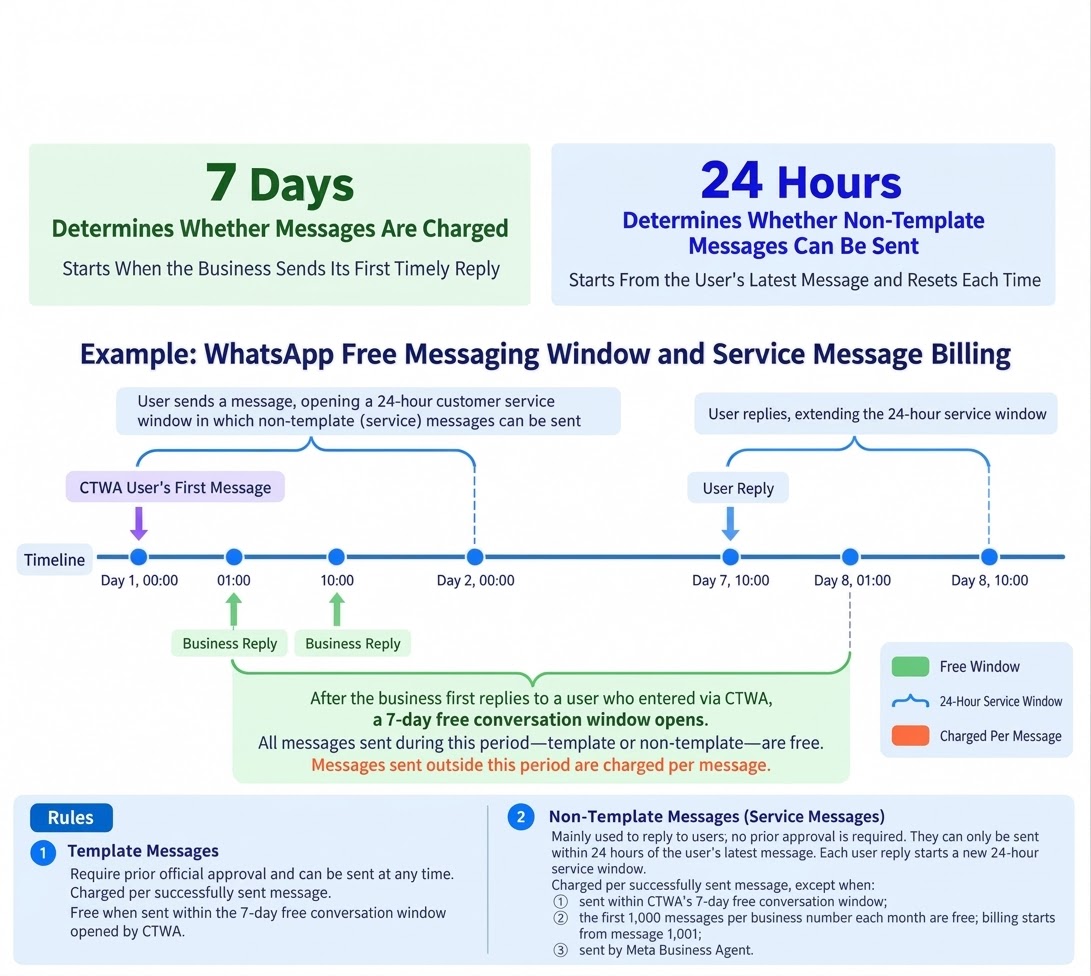
This makes CTWA a good fit for follow-up: you have days, not hours, to send quotes, reminders and offers at no message cost.
How to set up Click-to-WhatsApp ads with Wetarseel
Connect your WhatsApp Business API number
Onboard your number to the official API through Wetarseel so your whole team and your chatbot can reply.
Link your Facebook Page and ad account
Your WhatsApp Business account, Facebook Page and ad account need to be connected in Meta Business Manager before you can run CTWA ads.
Create the ad in Meta Ads Manager
Choose WhatsApp as the message destination, write one clear offer and add a greeting and conversation starters customers can tap.
Automate the first reply
Use the chatbot flow builder to greet the lead, ask two or three questions and collect name, need and budget.
Route and follow up
Tag the lead, assign it in the team inbox and send approved templates for reminders and offers.
What to automate after the click
Instant greeting
Reply within seconds, even at night, and set expectations for when a person will follow up.
Qualification questions
Ask a few questions in a flow and save the answers on the contact.
Tags by campaign
Tag leads with the ad or offer they came from so you can compare campaigns later.
Assignment and handover
Hand the chat to the right agent when the lead is ready, with the full conversation in front of them.
Follow-up templates
Send reminders, quotes and offers while the free window is open.
Lead sync to your CRM
Use the API and webhooks to send leads to HubSpot, Zoho or your own system, or use the built-in WhatsApp CRM.
Best practices for CTWA campaigns
- Make one clear offer. The ad should say what the customer gets and why they should message now.
- Reply fast. Your first reply opens the free window, and speed keeps the lead warm.
- Ask one question at a time. Short, tappable questions get more answers than long forms.
- Write in your customer’s language. English, Urdu and Arabic flows can run side by side.
- Ask for consent to send updates. A chat the customer starts is a good moment to ask. Read our opt-in rules.
- Show your hours so people know when to expect a human.
How to measure results
| What to track | Where to see it |
|---|---|
| Ad spend and conversations started | Meta Ads Manager |
| Leads qualified in chat | Wetarseel tags and flow answers |
| Replies and follow-up activity | Wetarseel inbox and campaign reports |
| Sales or bookings from leads | Your CRM or sales records |
Divide spend by qualified leads and by sales, not just by conversations started, to see which ads really pay back.
Frequently asked questions
What is a Click-to-WhatsApp ad?
It is a Facebook or Instagram ad with a button that opens a WhatsApp chat with your business. The customer sends the first message.
Are messages free after someone clicks my ad?
Per Meta, a reply to a customer who messages you from a CTWA ad opens a free entry point window of up to 7 days in which marketing, utility, authentication and service messages are not charged. It applies to customers using the Android or iOS app.
Do I need the WhatsApp Business API for CTWA ads?
You can point ads at the WhatsApp Business app, but the API is better for teams and automation, because many agents can answer from one number and a chatbot can reply instantly.
Does Wetarseel run my ads?
No. You create and pay for ads in Meta Ads Manager. Wetarseel handles what happens after the click: replies, qualification, assignment, follow-up and reporting.
How much does it cost?
Ad spend is set by your Meta budget. Wetarseel plans start at $45 a month billed yearly, plus Meta’s per-message charges with no markup. See the pricing page.
Related: use QR codes and click-to-chat links to start WhatsApp conversations offline.
Turn ad clicks into conversations
Start a free trial, or tell us about your campaign and we will help you set up the replies and follow-up.
Start a free trial Talk to our team