Developer Documentation
API Reference & Webhooks
Connect your CRM to WhatsApp to send notifications, bills and invoices, broadcast messages from your own system, or build a custom chatbot. This guide walks you through our APIs and webhooks so you can get it running quickly.
Choosing the right endpoint
Four endpoints cover most integrations. Pick based on what you're sending and whether the customer messaged you in the last 24 hours.
Endpoint
24h window
Template needed
Media
Best for
POST /send-message
Required for text · optional for template
Optional
None
General chat, order updates
POST /send-media
Required (24h)
Not needed
Images, videos, PDFs, audio
Customer replies, photos on request
POST /send-message-with-file
Not required
Meta template required
Header attachments
Marketing broadcasts, PDF invoices
POST /add-lead
—
None
—
Website forms, lead sync
Integrating WeTarseel with your CRM
Your development team can use the API key and endpoint URL below to connect your CRM, website, or third-party software. The example here shows the send-message endpoint.
1. Connect your CRM, website, or third-party software to the trigger point using the API key and endpoint URL shown below.
HTTP Request
POST https://app.wetarseel.ai/api/v1/send-message
Free-form text message
curl -X POST https://app.wetarseel.ai/api/v1/send-message \
-H "Authorization: Bearer XXXXXXXXXXXXXX" \
-H "Content-Type: application/json" \
-d '{
"to": "971501234567",
"message": "Hello from WeTarseel!"
}'
Template message
curl -X POST https://app.wetarseel.ai/api/v1/send-message \
-H "Authorization: Bearer XXXXXXXXXXXXX" \
-H "Content-Type: application/json" \
-d '{
"to": "971501234567",
"template_name": "welcome_message",
"parameters": ["John Doe"]
}'
Request Parameters
Fields accepted by the send-message endpoint.
Parameter
Type
Description
to *
string
Recipient phone number with country code, e.g. "971501234567".
message (opt)
string
Plain text body. Required if template_name is not provided (24h window applies).
template_name (opt)
string
Meta-approved WhatsApp template name (can be sent anytime).
parameters (opt)
string[]
Array of positional strings for template variables, e.g. ["John", "INV-102"].
Webhooks
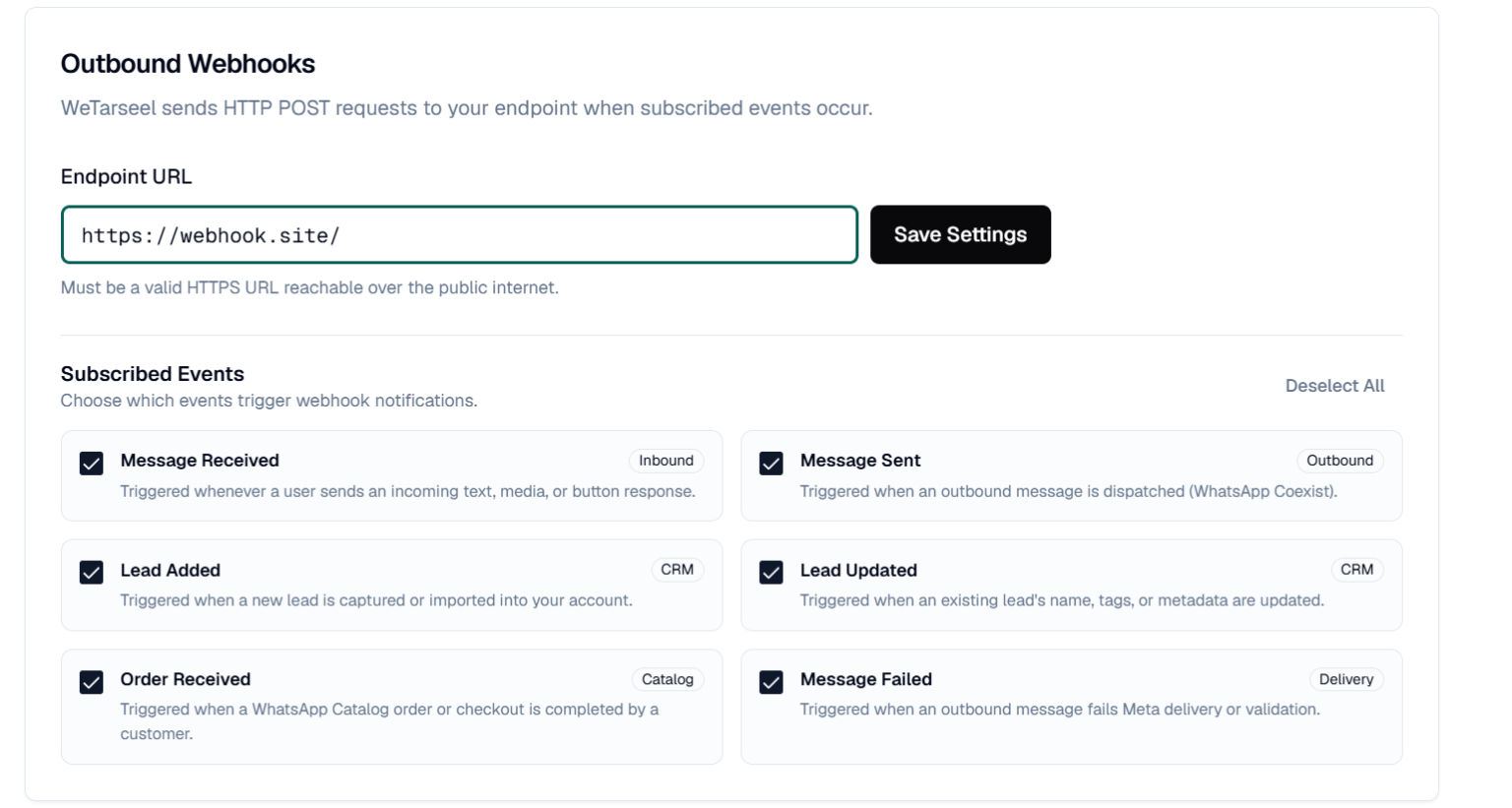
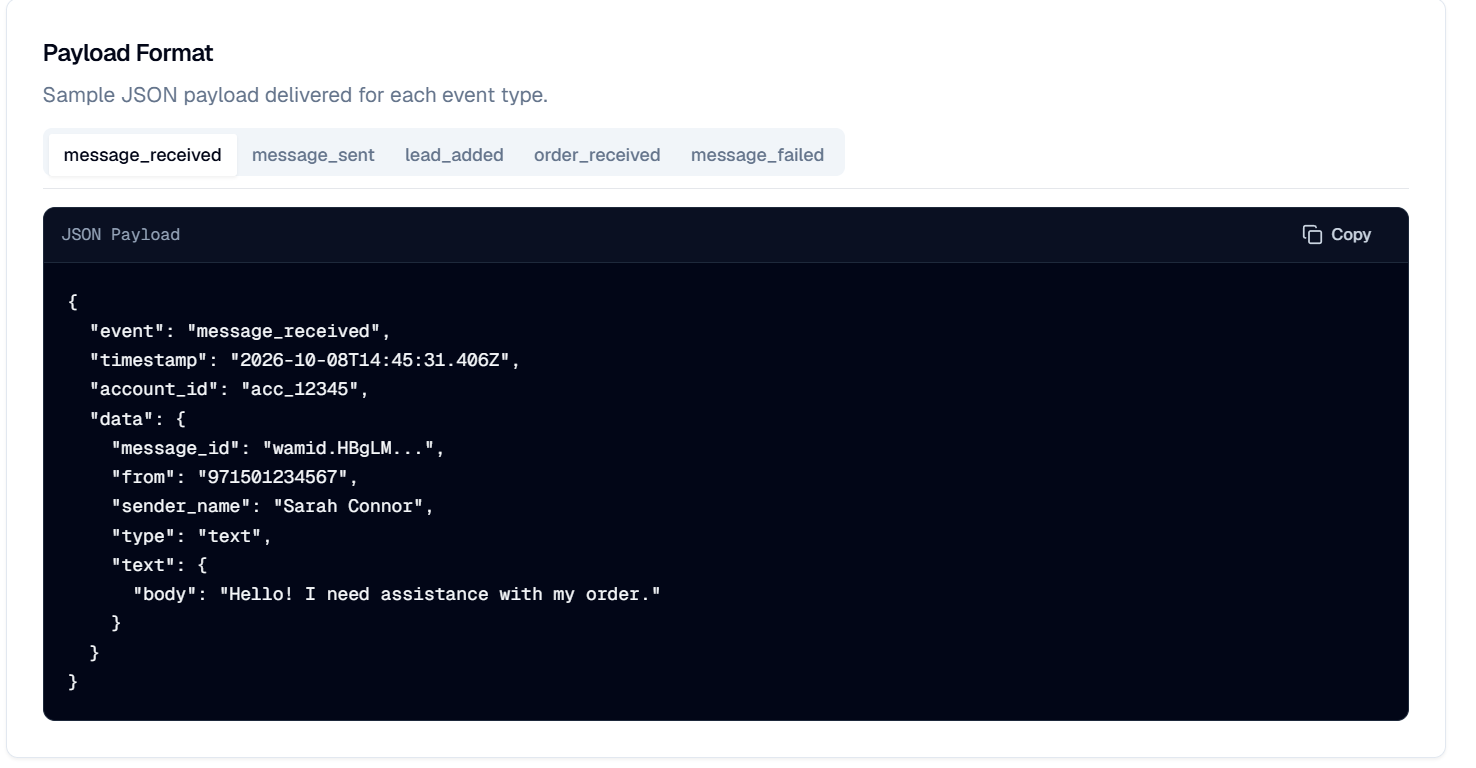
Attach a webhook in WeTarseel to receive these events in real time as they happen in your account.
Message received
Triggered whenever a user sends an incoming text, media, or button response.
Message sent
Triggered when an outbound message is dispatched (WhatsApp Coexist).
Lead added
Triggered when a new lead is captured or imported into your account.
Lead updated
Triggered when an existing lead's details are changed in your account.
Order received
Triggered when a WhatsApp Catalog order or checkout is completed by a customer.
Message failed
Triggered when an outbound message fails Meta delivery or validation.