
The basics
What is the WhatsApp Business API?
The WhatsApp Business API is the business version of WhatsApp. It is built to handle many customer chats at once.
It does not run on one phone. It connects to your company software or CRM. Then it sends messages for you, like confirmations, reminders, and invoices.
Why Companies Use It
✓ Every customer already uses WhatsApp. No app to download.
✓ Replies are instant, so fewer missed calls.
✓ Reminders and updates go out on their own.
✓ Regular follow-ups bring customers back.
Did You Know?
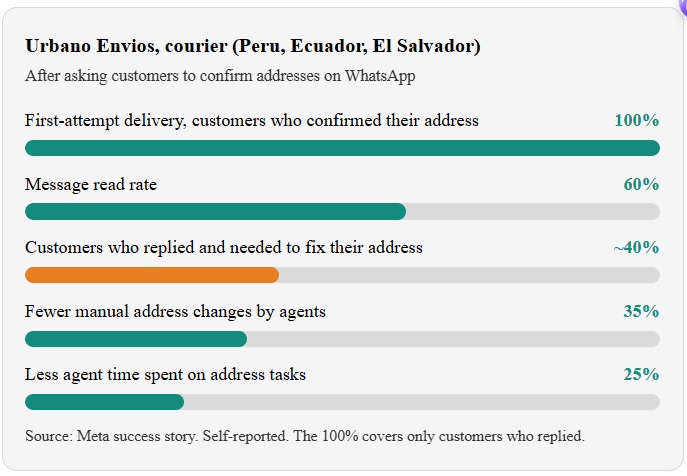
At Urbano Envios, a courier in Latin America, half of all incomplete deliveries used to come from wrong addresses. After it began confirming addresses on WhatsApp, customers who confirmed got 100% first-attempt delivery (self-reported to Meta).
Why it matters
Why Logistics and Courier Companies Need WhatsApp API?
Logistic and courier companies deal with dozens of daily customer interactions: calls, updates, quotations, and reminders. Doing all of this manually takes time, and it's easy to miss something. Here's why WhatsApp API helps:
📱
Every customer already uses WhatsApp
No app downloads needed.
⚡
Faster communication
Replies are instant, reducing missed calls.
⏱️
Automation saves time
Confirmations, updates, and reminders run automatically.
⭐
Professional image
Customers see your company as modern and reliable.
🔁
Builds loyalty
Regular follow-ups bring customers back for future services.
Use cases
5 Ways Logistics & Courier Companies Can Use WhatsApp API
01
Parcel Tracking in Chat
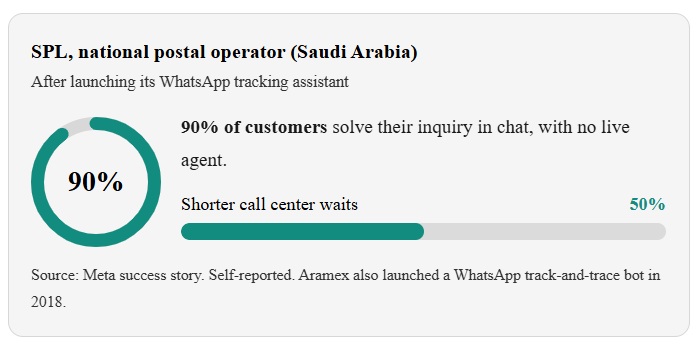
Customers send their tracking number. Your system replies with the status in seconds. No call. No waiting.
Example: "Your parcel is at our city hub. Expected delivery: tomorrow, 2 PM to 6 PM."
02
Delivery Alerts at Every Step
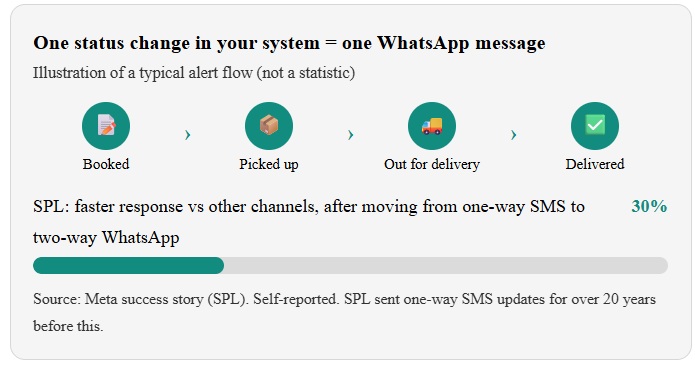
Send a short message when the parcel is booked, picked up, out for delivery, and delivered. Each message is sent automatically from your system.
Example: "Hi Sara, your parcel is out for delivery today. Rider: Ahmed."
03
Address & Location Confirmation
Ask customers to confirm their address before the rider leaves. Let them share a location pin with one tap.
Example: "Is your address still Flat 4, Green Tower? Reply YES or share your location."
04
Cash on Delivery (COD) Confirmation
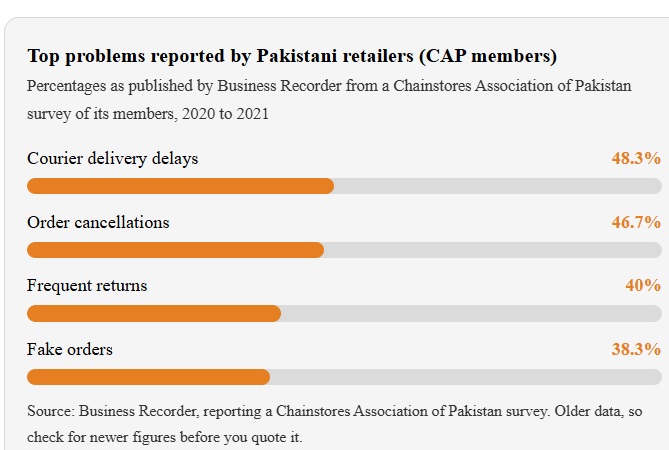
COD parcels get refused or missed more often. Message the customer before dispatch. Ask them to confirm and keep the cash ready.
Example: "Your order arrives tomorrow. Please keep AED 150 ready. Reply YES to confirm or RESCHEDULE."
05
Reschedule, Returns & Live Agent Support
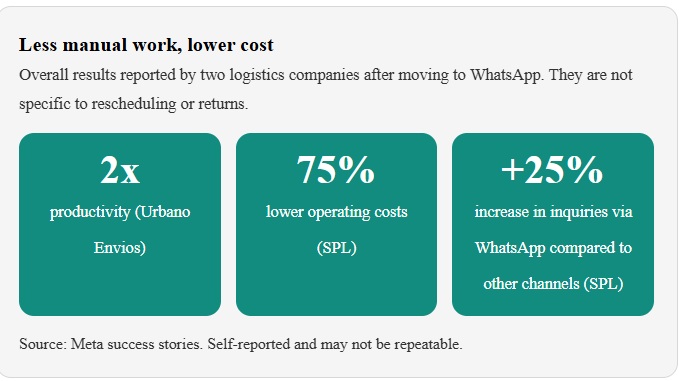
Let customers pick a new time, add a gate code, or book a return pickup. If the case is hard, like a damaged parcel, hand the chat to an agent with the full history.
Example: "Not home today? Reply RESCHEDULE and pick a new day."
In 5 steps
How to get started
From signing up to sending your first booking confirmation, most garages are live in a few days.
01
Pick an official provider
WhatsApp API access comes through a Meta-authorized provider like Wetarseel.
02
Verify your business
You need a Meta Business account, your business documents, and a WhatsApp number for your garage.
03
Set up message templates
Templates are pre-approved messages.
"Hi {{1}}, your parcel {{2}} is out for delivery today."
04
Connect your system
Link your dispatch software, CRM, or store through our integrations or API docs. No system? Build flows with the chatbot flow builder.
05
Train your team
Reply fast, keep the tone polite, and save quick replies for common questions like cost, timings, and directions.
FAQ
Frequently Asked Questions
Everything garage owners usually ask before getting started with WhatsApp API. Can't find your answer? Talk to our team.
Contact us
How is WhatsApp Business API different from the regular WhatsApp?
The API is built for businesses. It lets your garage automate messages, use approved templates, connect to your CRM, and handle many chats at once, 24/7.
Do I need to verify my business?
Yes. WhatsApp asks you to verify your business through a Meta Business account, and to verify the phone number you want to use. This unlocks templates and higher messaging limits.
Do I need customer permission?
Yes. Meta requires opt-in before you send proactive messages. The opt-in must name your business, and customers must be able to opt out.
How much does WhatsApp API cost?
Cost depends on your provider's plan, plus Meta's per-message fees for template messages, which vary by country and message type. See Wetarseel pricing for a clear breakdown.
Which provider should I choose?
Choose an official Meta-authorized provider with CRM integration, ready-made templates, a shared team inbox, and clear pricing. Wetarseel offers all of these.
Will it reduce failed deliveries?
It can help. Urbano Envios reported 100% first-attempt delivery for customers who confirmed their address. That result is self-reported and not guaranteed, so measure your own rate.
Can WhatsApp send tracking updates automatically?
Yes. When a status changes in your system, such as "out for delivery", the API sends an approved template to the customer.
Do I need technical skills?
Not much. Verification, template approval, and system connection are needed, but a good provider guides you through each step with a simple dashboard.
What limits should I expect?
Template approval takes some time, message content must follow WhatsApp policy, customers must opt in, and some message types are charged.