
The basics
What is the WhatsApp Business API?
The WhatsApp Business API is the business version of WhatsApp. It is built to handle many customer chats at once.
It does not run on one phone. It connects to your garage software or CRM. Then it sends messages for you, like confirmations, reminders, and invoices.
Why use it
✓ Every customer already uses WhatsApp. No app to download.
✓ Replies are instant, so fewer missed calls.
✓ Reminders and updates go out on their own.
✓ Regular follow-ups bring customers back.
Did You Know?
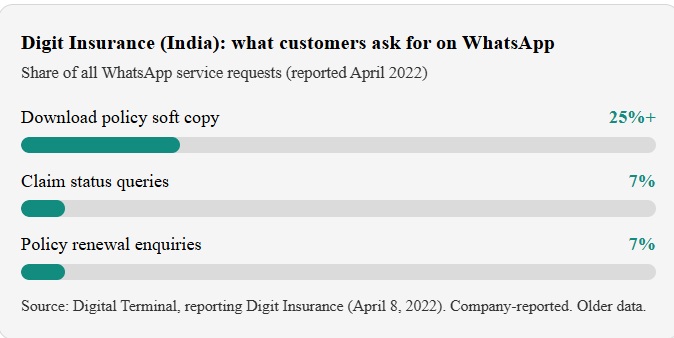
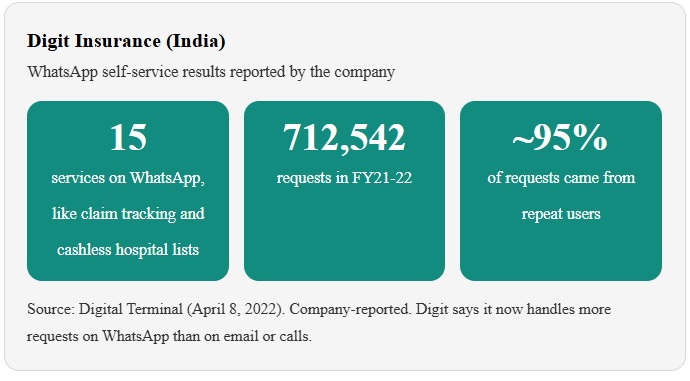
In one financial year (FY21-22), Digit Insurance in India received 712,542 service requests on WhatsApp. Nearly 95% came from customers who had already used the service before.
Why it matters
Why Insurance Sector Need WhatsApp API?
Insurance companies deal with dozens of daily customer interactions: calls, updates, quotations, and reminders. Doing all of this manually takes time, and it's easy to miss something. Here's why WhatsApp API helps:
📱
Every customer already uses WhatsApp
No app downloads needed.
⚡
Faster communication
Replies are instant, reducing missed calls.
⏱️
Automation saves time
Confirmations, updates, and reminders run automatically.
⭐
Professional image
Customers see your insurance as modern and reliable.
🔁
Builds loyalty
Regular follow-ups bring customers back for future services.
Use cases
5 Ways Insurance Company Can Use WhatsApp API
01
Policy Delivery & Document Download
Customers often need their policy copy fast. A WhatsApp chat can send it in seconds. No login. No email search.
Example: "Hi Sara, your motor policy is ready. Tap below to download your policy copy."
02
Collect the delivery address without mistakes
Wrong addresses cause late and failed deliveries. So ask for the address in a clear way.You can send a location request message. The customer taps one button to share their location. For more detail, use a WhatsApp Flow. It is a short form inside the chat. It can ask for name, street, landmark, and delivery notes.
03
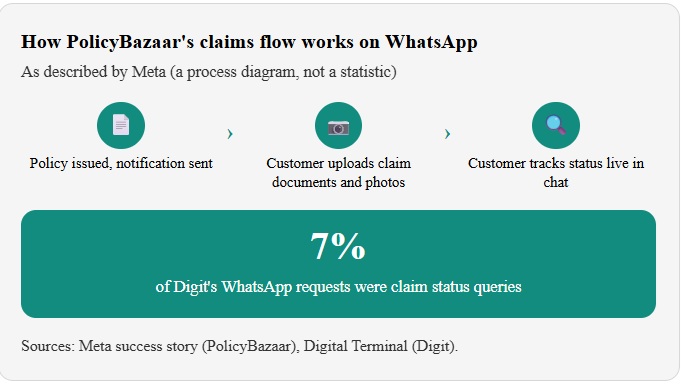
Claims Updates & Document Upload
Claims are stressful. Customers want to know one thing: "What is happening with my claim?" WhatsApp gives status updates without a phone queue.
Meta rule: Do not ask people to share full payment card numbers, financial account numbers, personal ID numbers, or other sensitive identifiers on WhatsApp. Ask for a policy or claim number instead.
Example: "Your claim CLM-1042 is under review. We will update you within 2 working days."
04
Quotes & New Policy Sales
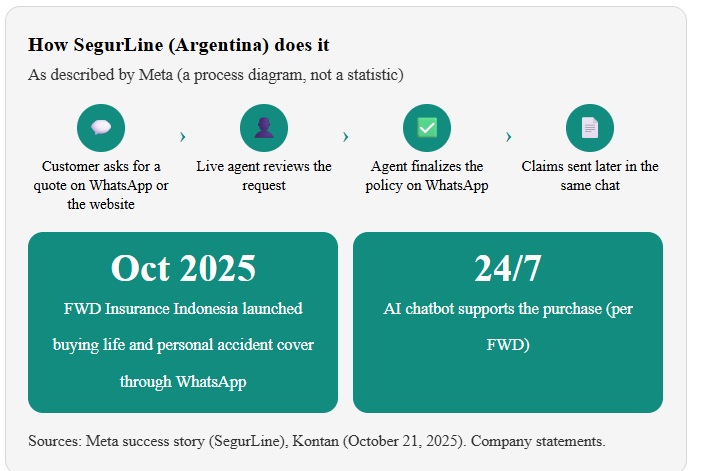
Many people start buying insurance on their phone. WhatsApp lets them ask for a quote in a chat they already use. A bot can answer fast. An agent can close the sale.
Note: Insurance sales rules differ by country. Check your regulator's rules on advice, disclosures, and records before you sell in chat.
Example: "Hi! Want a quote for travel insurance? Send your trip dates and destination."
05
24/7 Self-Service & Live Agent Handoff
Many questions repeat: policy copy, claim status, nearest hospital, renewal date. A bot can answer these any time. Agents then focus on hard cases.
Example: "Reply 1 for policy copy, 2 for claim status, 3 for renewals, or 4 to talk to an agent."
In 5 steps
How to get started
From signing up to sending your first booking confirmation, most garages are live in a few days.
01
Pick an official provider
WhatsApp API access comes through a Meta-authorized provider like Wetarseel.
02
Verify your business
You need a Meta Business account, your business documents, and a WhatsApp number for your garage.
03
Set up message templates
Templates are pre-approved messages.
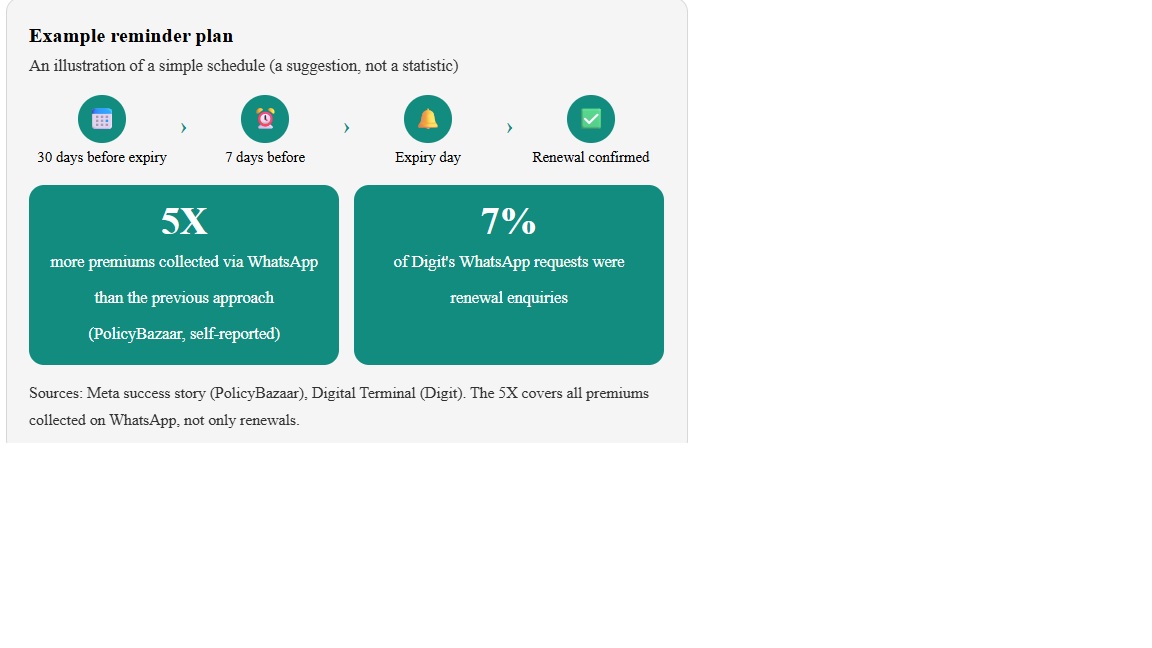
Templates are pre-approved messages. Example: "Hi {{1}}, your policy {{2}} expires on {{3}}. Reply RENEW to continue."
04
Connect your system
Link your company software or CRM so messages go out when a purchase is made, a job is done, or a bill is created. No system? Use your provider's dashboard or chatbot builder.
05
Train your team
Meta requires customer opt-in before you send messages first. Add opt-in at purchase or onboarding. Then teach agents to reply fast and keep data safe.
FAQ
Frequently Asked Questions
Everything garage owners usually ask before getting started with WhatsApp API. Can't find your answer? Talk to our team.
Contact us
Can insurance companies use the WhatsApp Business API?
Yes. Digit Insurance, PolicyBazaar, SegurLine, and FWD Insurance Indonesia all use WhatsApp for customer service or sales, according to Meta and news reports.
Is it safe to share insurance details on WhatsApp?
Follow Meta's rule: do not ask customers for full card numbers, financial account numbers, or personal ID numbers. Use policy or claim numbers instead. Also check your local insurance regulator's rules on customer data.
Can I send policy documents on WhatsApp?
Yes. Gibraltar BSN Life in Malaysia delivered e-policies through WhatsApp, and PolicyBazaar lets customers upload claim documents and images in chat.
Do I need customer permission?
Yes. Meta requires opt-in before you send proactive messages. The opt-in must name your business, and customers must be able to opt out.
Which provider should I choose?
Choose an official Meta-authorized provider with CRM integration, ready-made templates, a shared team inbox, and clear pricing. Wetarseel offers all of these.
Can agents and brokers use it too?
Yes. SegurLine is an insurance brokerage. Its agents follow up with customers on WhatsApp after a bot or form collects the first request.
How much does it cost?
Meta charges for each delivered message, based on message type and the customer's country. Messages from customers are free. Since October 1, 2026, utility templates sent inside the 24-hour window are also charged, and service replies are free only for the first 1,000 per number each month. See Wetarseel pricing for a clear breakdown.
Do I need technical skills?
Not much. Verification, template approval, and system connection are needed, but a good provider guides you through each step with a simple dashboard.
What limits should I expect?
Template approval takes some time, message content must follow WhatsApp policy, customers must opt in, and some message types are charged.